
Avoma allows you to share a meeting agenda via Email with your participants before the meeting. Doing so encourages meeting attendance and helps you set the right expectations with your meeting participants in advance so they know what to expect in the upcoming meeting.
Sharing an Agenda
- From your Meetings dashboard, click an upcoming meeting title. You will be taken to the Note Editor.
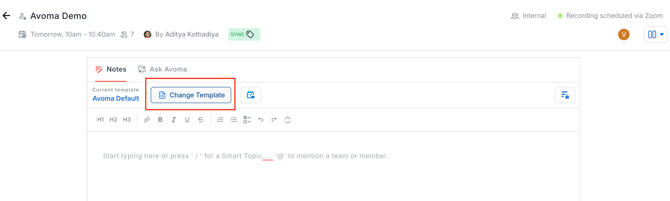
- Click on the 'Change Template' button at the top
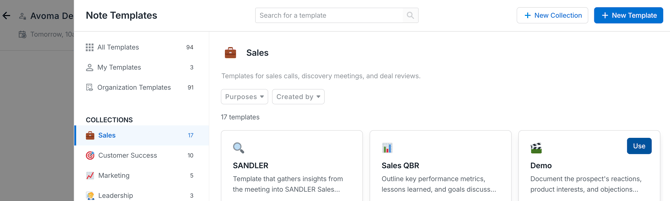
- From the Templates Library click on the 'Use' button of the notes template you desire to use.
- The notes template will be applied to your meeting.
- You can update the notes for the meeting by adding a smart topic. Within the Note Editor, type “/” (or click on the “+” icon) to open up the Smart Topics interface.
- Once you’re happy with the agenda, click on the Share Agenda via Email button at the top of the Notes Editor.

- The content under the Agenda section will be auto-populated and will be shared. You will then see a template of the email to be sent out to make sure all your agenda items are showing up correctly. Review/edit your agenda and click Send Email.
What’s next
- Check out Avoma's pre-defined meeting templates
- Use Avoma's readymade meeting notes templates
- Create new meeting notes templates and collections
If you have any additional questions, please contact our team at help@avoma.com.