
Deal methodologies like BANT, MEDDICC, and SPICED help reps consistently qualify deals. But manually validating adherence across calls and emails doesn’t scale.
Avoma’s Deal Methodology feature automatically extracts and organizes methodology insights from meetings and emails, so deal reviews are evidence-based and objective.
This article is for RevOps and Sales Admins who want to configure, enable, and manage deal methodologies in Avoma.
|
Before you begin
|
Step 1: Understand deal methodologies in Avoma
A deal methodology in Avoma is a structured framework that helps you:
- Track whether reps are capturing the right information for each deal
- Automatically extract insights from meetings and emails
- Surface compliance and gaps directly in the deal dashboard
- Support deal reviews with verifiable, AI-generated evidence
Each methodology is built from Smart Topics.
Examples:
- BANT → Budget, Authority, Need, Timeline
- MEDDICC → Metrics, Economic Buyer, Decision Criteria, Decision Process, Identify Pain, Champion, Competition
- SPICED → Situation, Pain, Impact, Critical Event, Decision
Step 2: Access deal methodology settings
- Go to Settings
- Select Organization Settings
- Open AI Methodologies
Here, you can view default methodologies, duplicate them, and manage configurations.
Step 3: Review default deal methodologies
Avoma provides three default, non-editable methodologies:
- BANT
- MEDDICC
- SPICED
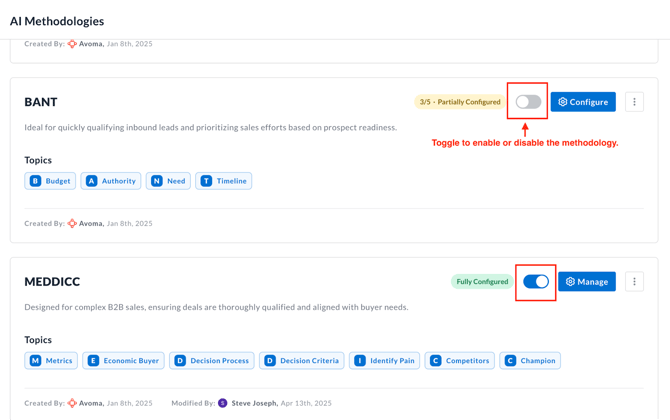
Use the toggle to enable or disable the deal methodology, which controls whether it is active in the system.
Note: If you are using HubSpot as your CRM, the methodology can only be enabled after it has been assigned to a pipeline.
Step 4: Pipeline assignment (Not needed in case of Salesforce)
To enable a deal methodology, you must apply it to the appropriate deals. How this is done varies depending on your CRM.
If you use HubSpot
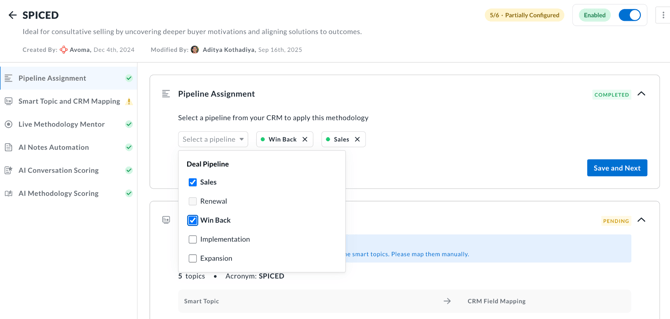
- Click the Configure button on the right of the methodology name.
- You will be in the Pipeline Assignment tab.
- From the dropdown, select one or more pipelines whose deals you want the methodology to apply to.
- Enable the methodology.
Note:
- One methodology can be used by multiple pipelines
- Each pipeline can use only one methodology at a time
If you use Salesforce
- You need not assign deals explicitly. Once the methodology is enabled, it applies automatically to all deals
Step 5: View deal methodology in the deal dashboard
After enabling:
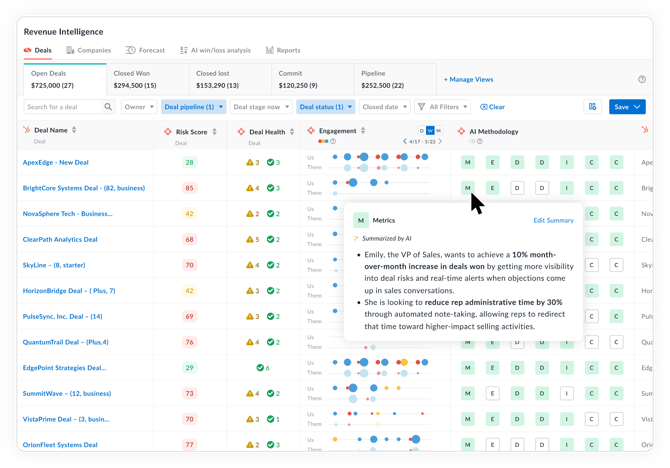
- A Methodology Qualification column appears in the deal dashboard (Revenue Insights -> Deals)
- Each deal shows methodology segment initials (for example, S · P · I · C· E· D)
How to interpret segments:
- Empty segment → No relevant insights found yet
- Light green segment → Insights extracted from meetings or emails
You can:
- Hover to preview insights
- Click to open a side drawer with detailed evidence
Step 6: Manage deal methodology
Admins can scale methodologies by creating their own custom ones.
To create a custom deal methodology:
- Duplicate an existing methodology by hovering over the three dots to the right of the methodology name and clicking Duplicate.
- Rename and update the description of the new methodology.
- Use duplicated methodologies to support different teams, regions, or sales motions.
Other Deal Methodology configuration settings
1. Manage Smart Topics within a methodology
You can fine-tune how methodologies work by editing Smart Topics.
If you customize a Smart Topic’s prompt or description, those updates automatically apply to all the related methodologies.
Available actions:
- Reorder Smart Topics with drag-and-drop
- Add Smart Topics from the curated list or create custom Smart Topics
Changes apply immediately to:
- Deal dashboards
- Methodology tracking
- Extracted insights
2. Enable Live Methodology Mentor (real-time guidance)
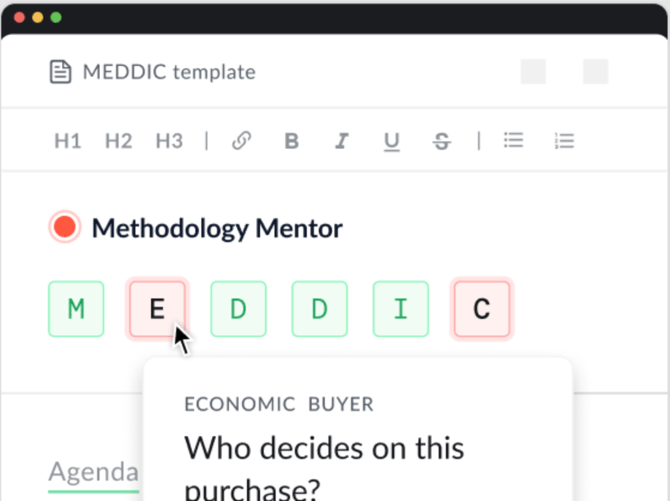
Avoma can guide reps during live conversations by detecting methodology topics in real time. This is powered by Live Methodology Mentor.
When enabled, reps get in-the-moment visibility into what’s been covered and what still needs attention without waiting for post-call analysis.
What Live Methodology Mentor does
During a live call, Avoma AI will:
- Prompt reps with key topics to address
- Automatically recognize when a topic has been covered
- Notify reps of topics not yet discussed
This helps reps stay on track while keeping the conversation natural.
How to enable Live Methodology Mentor
For a deal methodology, toggle Live Methodology Mentor to Yes, enable (recommended)
As an admin, you can also choose to disable it for all users in your organization if real-time guidance isn’t desired.
Usage notes for reps
- Live guidance appears only during active calls
- Topic detection runs automatically, no rep action required
- Coverage status updates in real time as the conversation progresses
Tip:
When screen sharing, to avoid Avoma appearing in shared screens, reps should use Zen Mode in the Avoma desktop app. This lets them monitor methodology topics privately while presenting aligns or demos.
3. Configure AI Notes Automation for a deal methodology
AI Notes Automation lets you control how Avoma captures methodology topics in meeting notes. You can choose whether to rely on existing purpose-based templates or apply a methodology-specific template tied directly to deals.
What AI Notes Automation does
When enabled, Avoma automatically applies the selected AI Notes template to capture this methodology’s Smart Topics across meetings without manual note selection.
Choose how templates are applied
You have two options:
Option 1: Keep using purpose-based templates
- Notes templates are applied based on the meeting purpose
- No direct link to deals or pipelines
- Best if your team already relies on purpose-driven note structures
Use this if you want methodology insights captured broadly, regardless of deal context.
Option 2: Use a methodology template
- Select a dedicated methodology AI Notes template
- Applied only to meetings linked to deals in the selected pipeline
- Ensures notes align tightly with your deal methodology
Use this if you want strict, deal-specific methodology tracking.
Tips
- Methodology templates work best when meetings are consistently linked to deals.
- Start with purpose-based templates, then switch to methodology templates once deal hygiene is strong.
- Changes apply to future meetings only—not past notes.
4. Configure AI Conversation Scoring for a deal methodology
AI Conversation Scoring lets Avoma automatically evaluate calls against your deal methodology. Scoring is based on a dedicated conversation scorecard template, ensuring consistent and objective call quality assessment.
How AI Conversation Scoring works
When enabled:
- Avoma evaluates calls using the methodology’s scorecard criteria
- Scores are generated automatically—no manual review required
- Results align directly with your deal methodology (for example, SPICED)
This helps managers identify strengths, gaps, and coaching opportunities at scale.
Select a conversation scoring template
- Open the deal methodology you want to configure
- In AI Conversation Scoring, select a conversation scoring template such as a SPICED Scorecard
- Save your selection
The selected template controls which questions and criteria Avoma uses for scoring.
Tips
- Start with a copied template to avoid changing a default scorecard.
- Keep scoring criteria aligned with Smart Topics for clearer coaching signals.
- Review auto-scoring rules periodically as sales motions evolve.
5. AI Methodology Scoring (deal-level evaluation)
- AI Methodology Scoring lets Avoma evaluate and score every deal based on your configured deal methodology. Instead of relying on rep-reported updates, Avoma scores each methodology topic using verified evidence from meetings and emails.
- You can view these scores directly in the Deals dashboard.
Bonus: Enable Smart Topic summarization (recommended)
As deals progress, Smart Topic notes can grow quickly. Summarization keeps deal views readable.
To enable:
- Go to Settings → CRM → Configure → Advanced Settings
- Turn on Summarize Smart Topic notes in the deals dashboard
What it does:
- Combines insights from multiple meetings and emails into a single summary
- Applies to deal columns and deal methodologies
- Excludes date-sensitive topics like Action Items and Follow-up Meetings
Notes:
- Enabled by default for new organizations
- Existing orgs can enable it anytime
- Summaries build gradually as new data is extracted
Tips
- Start with a default methodology, then duplicate and customize it once teams are comfortable.
- Use summarization if your reps have frequent meetings. It dramatically improves deal readability.
- Align Smart Topic prompts closely with how your team actually qualifies deals.
Troubleshooting and FAQs
Why don’t I see methodology insights on older deals?
This is expected behavior.
- Avoma backfills data for the past 90 days only
- Email insights appear immediately
- Meeting insights may take additional time
- Deals older than 90 days may have limited or no data
If data still doesn’t appear after 24 hours, contact Avoma Support.
Does Live Methodology Mentor affect post-call insights?
No—this is additive.
- Real-time prompts help during the call
- Post-call extraction and summaries still work as usual
What’s next
- Learn how to configure Smart Topics in detail
- Review and customize AI Deal Scorecards to standardize deal quality reviews
To drive adoption:
- Roll out one methodology per pipeline before expanding
- Train managers to use methodology evidence during deal reviews
Recap
You’ve now configured a deal methodology in Avoma and enabled automatic, evidence-based deal qualification. With methodologies, Smart Topics, and scorecards working together, deal reviews become faster, more consistent, and far more reliable.